


You found the tapes. The VCR disappeared three house moves ago. Now there is a wedding, a birthday or an entire childhood in a box, and nothing in the house will play it.
You can have your VHS tapes converted to digital without owning a VCR. A transfer service supplies the playback equipment. If you want to do the transfer yourself, you will need a working VHS-compatible player as well as equipment that captures its video signal.
The useful question is which route makes sense for your collection.
Planning to do it yourself? Part 2: our VHS-to-digital equipment guide compares complete setups, explains what to buy and helps you check compatibility before ordering.
Your VHS conversion plan at a glance
If you have a box of tapes and no player, start here:
- Photograph the format markings and labels. Count the tapes; leave unknown running times unknown.
- Set aside anything visibly damaged. Ask about those items before attempting playback.
- Choose a transfer service, a suitable borrowed player or a local digitization facility.
- Agree on the files you want, the costs and what happens to your originals.
- Check the finished videos and keep independent backup copies.
You do not need to know what is on every tape before asking for help. Start with what you can see on the outside of the collection.
What a “VHS-to-USB converter” actually does
This article contains Amazon.com affiliate links. We may earn a commission if you buy through them, at no additional cost to you.
A USB capture adapter does not read the cassette. It receives the video and audio coming out of a player and passes that signal to a computer. For example, Elgato's capture hardware requires a separate analogue video source, such as a VCR or camcorder. The player is not included. Elgato's product documentation.
Some devices, such as the ClearClick Video to Digital Converter 2.0, record the signal directly to a USB flash drive or SD card without a computer. You still need a working VCR or compatible camcorder to play the tape, and compatible recording storage is sold separately. Check the manufacturer's input connections and storage requirements before buying.
Before buying equipment, check the full setup required. An adapter, a cable or a phone app cannot supply the missing tape-playback mechanism.
Three practical options
| Option | What you need | What to consider |
|---|---|---|
| Use a transfer service | Your tapes and an outline of what you want | Ask about format support, condition, delivery, price and return of originals |
| Borrow or buy a working player | A compatible player, capture equipment, software and time | You will need to set up, capture and check the results yourself |
| Check a library or community digitization station | A participating facility and the equipment it requires | Availability, booking rules and supported formats vary |
Some Canadian libraries offer digitization equipment. Haldimand County Public Library, for example, describes a kit that still requires connection to a working media player. Check your own library's current facilities before planning a project around that option. Library equipment details.
For a small collection, compare the complete equipment cost and your time with a service quote. If you enjoy a technical project and already have suitable equipment, doing it yourself may be appealing. If you mainly want to watch the recordings again, asking a service to handle the transfer may be simpler.
Whichever route you choose, keep more than one copy of the finished files. A separate external drive, such as a WD Elements 2TB portable hard drive, can hold an additional backup copied from your computer. Check your computer's ports and formatting requirements first, and keep another copy in a separate location. This is backup storage, not a device that plays or converts VHS tapes.
Start by identifying what is in the box
Need help choosing a route? Tell us the tape formats, approximate quantity and any condition concerns. Ask Porthos about your VHS transfer.
A collection of “old videos” may contain several kinds of media. Photograph the cassette fronts, backs and any format markings. Keep the cases and handwritten labels together.
You do not need to buy a player just to make an enquiry. A description, approximate tape count and clear photographs give a transfer service a useful starting point. Mention any damage or playback problems you already know about.
Have tapes and no way to watch them? Get in touch with Porthos Media and tell us what you have.
VHS, VHS-C and MiniDV are not interchangeable
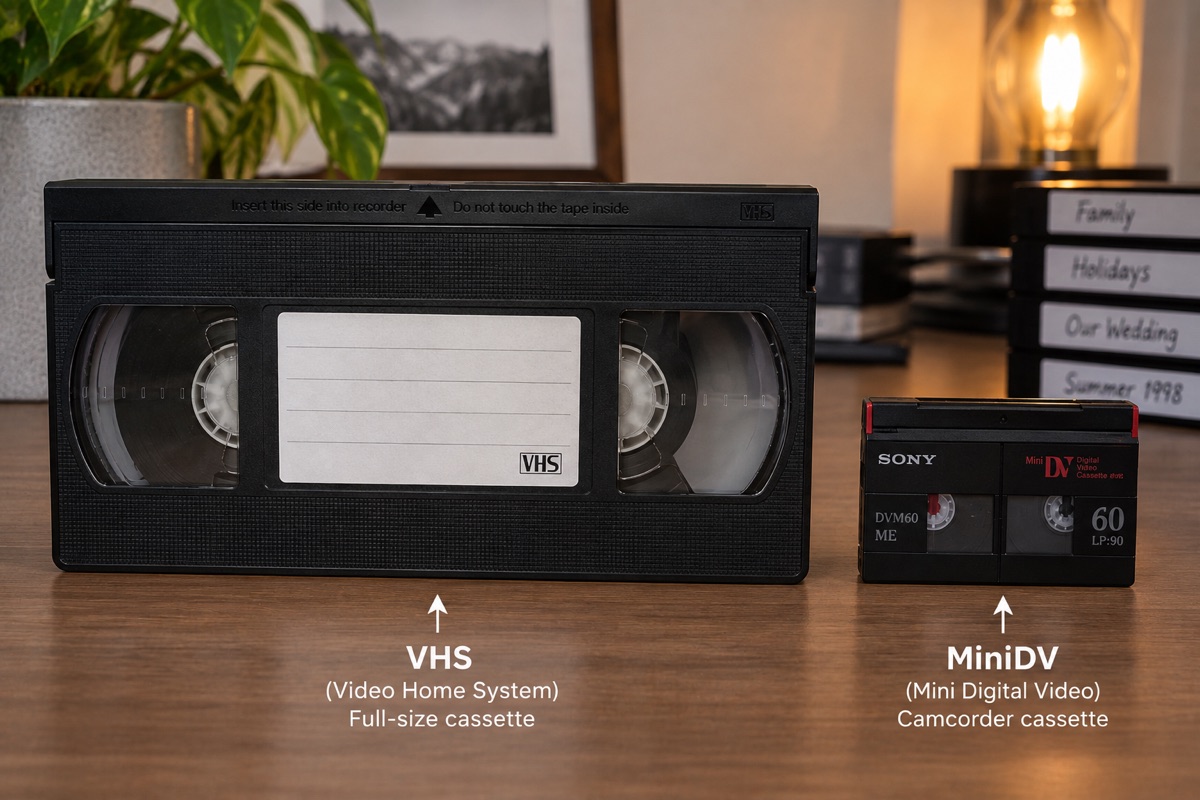
The format name matters more than the size or brand of the cassette. A small camcorder tape is not automatically a miniature VHS tape.
| Marking on the cassette | What it tells you | Before choosing equipment |
|---|---|---|
| VHS | Full-size VHS videotape | Confirm that the player supports the recording system used on the tape |
| VHS-C | Compact VHS camcorder cassette | Requires compatible VHS-C playback equipment or a suitable adapter and VHS player |
| Video8 or Hi8 | A different camcorder tape family | Requires compatible playback equipment; a VHS-C adapter is not the solution |
| MiniDV | A digital camcorder cassette | Requires compatible MiniDV equipment; it does not play in a VHS machine |
| No readable label | Format or content is uncertain | Send photographs before buying a player or adapter |
Sony's camcorder playback guide explains format compatibility. Check the exact model's manual rather than assuming every camcorder from the same brand plays the same tapes.
Keep the stories attached to the tapes
Give each cassette a simple inventory number, such as TAPE-001, and record the label exactly as written. Keep any extra information separate: “possibly Grandma's birthday” is more useful than quietly turning a guess into a fact.
Download the tape inventory worksheet to open in Excel, Numbers or Google Sheets. It has spaces for the format, label, known date, condition, priority and eventual digital filename. You can complete it without playing a single tape.
Don't test a visibly damaged tape just to find out what is on it
If a cassette is broken, has been wet or shows possible mould, ask for advice before playing it. The Canadian Conservation Institute recommends assessing tape condition before digitization and warns that playing contaminated or damaged tapes can harm the recording or the equipment. CCI's VHS digitization guidance.
Describe the problem when making an enquiry. An assessment does not guarantee that every recording can be recovered.
If you choose DIY: the equipment and workflow
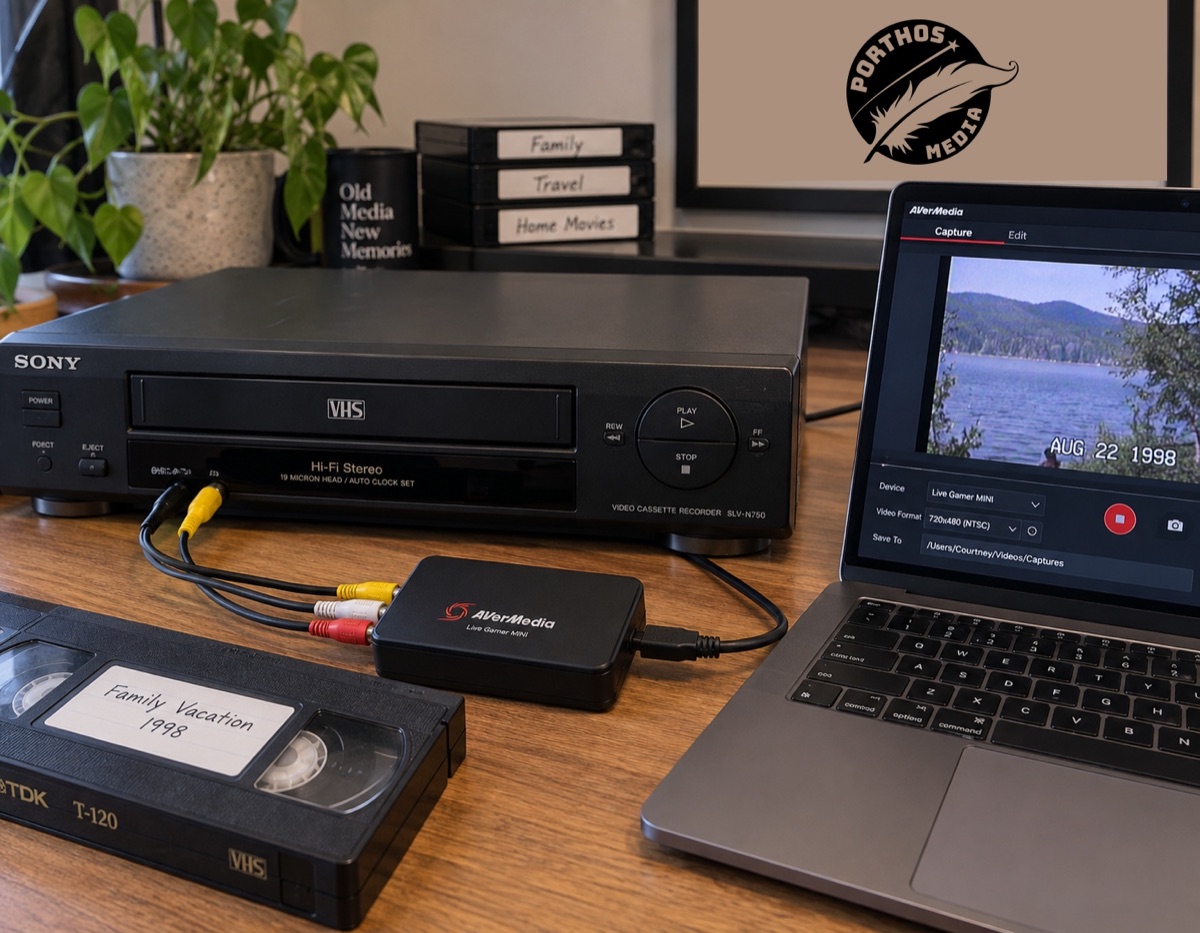
A basic computer-based setup has four parts: a working compatible player, audio/video cables, a capture device and a computer with supported capture software. Storage is needed for both the initial recordings and their backups. Check operating-system compatibility before ordering hardware, especially if your computer is newer than the capture device.
Signal path: tape → compatible player → capture device → digital recording. With a computer-based device, the recording is saved on the computer. With a standalone recorder, it is saved to compatible storage connected to that recorder.
Make a short test before recording the collection
Follow the instructions supplied with your equipment. For a typical analogue setup:
- Connect the player's audio/video outputs to the capture device's matching inputs.
- Select the input in the capture software or recorder and confirm that you can see a picture and hear the recording.
- Record a short sample, stop recording and play the saved file back.
- Check the picture's proportions, sound and whether speech matches lip movement.
- Once the sample is satisfactory, record the tape, save it under its inventory number and check the resulting file.
The ClearClick setup manual illustrates the player-to-recorder connection for that particular device. Your ports and settings may differ. The photograph above is an illustration of equipment, not a wiring diagram for every setup.
Allow for playback time, not just copying time
Capturing a tape means recording it as it plays. An hour of footage therefore takes about an hour to capture at normal playback speed, before setup, checking, naming and backup work. Ten one-hour tapes mean roughly ten hours of playback alone. That is a planning example, not an estimate of what is recorded on your tapes or a promise about a service's turnaround.
What should the finished digital files look like?
Tell the person doing the transfer where you want to watch the recordings: a computer, a phone, a television or all three. Ask for a sample file you can try on your own device before committing to the whole collection.
MP4 describes a file container, not a quality guarantee. Elgato, for example, documents H.264 video output, but the final result still depends on the source and transfer setup. Ask about both the file format and the intended playback devices rather than relying on the filename alone. Elgato output specifications.
USB, download and DVD mean different things
| Delivery option | What to clarify |
|---|---|
| Digital download | How to download the complete files, how long the link remains available and where you will keep your own copies |
| USB storage | Whether it contains video files, which devices can play them and whether the storage device is included in the quote |
| DVD | Whether it is a playable DVD-Video disc or a data disc containing files, and whether your player supports it |
These are questions to discuss with your chosen provider, not a promise that every provider offers every option. A television having a USB socket does not by itself confirm it can play your particular video files.
Ask for a faithful transfer before enhancement
The first goal is to preserve the recording you have. Agree separately on any editing, cropping, noise reduction or other changes, and ask whether you can retain a copy before optional enhancement. A useful review question is: “Does this still look and sound like our original recording?”
How to compare VHS-to-digital costs
There is no meaningful total without knowing what the quote includes. Make a list of your tapes, separate unknown or damaged items, and explain the delivery you want. If the running time is unknown, say so instead of estimating it from the cassette's printed capacity.
For DIY, total the player, capture equipment, any required cables or software and storage. For a service, ask about the charging basis and extras. Put those totals beside the time you would spend setting up and checking the work. Equipment you already own can change the comparison considerably.
Use Porthos Media's mail-in order form as a starting point for your collection, or ask us about an uncertain format or condition. Confirm the project details before sending originals.
What to ask before agreeing to a transfer
Ask for an explanation of:
- What the quote covers, including any limits, minimums or additional work.
- How unknown or blank tapes are handled.
- Which digital files you will receive and how they suit the devices you want to use.
- Whether USB media, downloads, shipping and taxes are included or separate.
- How your tapes and labels will stay associated with the finished files.
- When the work is expected to be ready and how your originals will be returned.
Those answers make two quotes much easier to compare than a price-per-tape headline alone.
Check and protect your finished videos
Before putting everything away, compare the delivered files with your inventory. Start, pause and seek through each file; listen as well as look. A quick spot-check can reveal a missing sound channel or an unexpected cutoff, but it cannot establish that every moment transferred correctly. Watch important recordings in full and ask about anything that seems missing.
Keep filenames understandable. For example, TAPE-001_Family-Christmas_date-unknown.mp4 preserves the connection to the cassette without inventing a year. Keep scans or photographs of handwritten labels alongside the files.
A download link is not your family archive
Download the files while access is available, check that the downloads open and make separate copies. Keep one backup away from the location of the first copy; a cloud copy may be one option, depending on your privacy preferences. Periodically confirm that the files still open and move them to newer storage when needed. The Library of Congress explains why relying on only one storage location is risky.
Keep a full-quality copy for yourself and make separate copies for sharing or editing. Decide who in the family should have access, and avoid making personal recordings public by default. Discuss returning your original tapes before the transfer starts.
Local help or mail-in service in Canada
Porthos Media is based in Summerland, BC, and helps Okanagan families and mail-in customers across Canada. Local handovers are arranged in advance.
Explore our tape and film transfer service, or read the mail-in instructions before sending your collection. Tell us what you have and what you hope to receive so we can confirm the next step.
Prepare a mail-in collection
Contact us first so we can confirm the formats and project. Keep related tapes together, use a sturdy box with protective packing and include your contact details and order reference. Flag anything fragile or damaged. Confirm the delivery service and current mailing instructions with us before shipping; not every carrier delivers to a PO box. We will arrange file delivery and the return of originals with you.
If you are nearby, get in touch to arrange a local drop-off or pick-up. Visits are by appointment. For a wider collection that also contains photographs or audio, start with our service directory so each format gets the appropriate next step.
Frequently asked questions about converting VHS
Sending tapes from elsewhere in Canada? Start a mail-in order before shipping originals so we can confirm your project and packing instructions.
Can I convert VHS to digital without buying a VCR?
Yes. You can use a transfer service or access suitable equipment through a friend or a participating library. Someone still needs a compatible working player to read the tape. You do not have to own that player yourself.
Can a USB converter play the tape for me?
No. The capture devices discussed here accept a signal from a separate player. They do not contain a VHS cassette mechanism. Check the complete equipment requirements before buying anything labelled “VHS to USB.”
Can I use a DVD player instead of a VCR?
A standalone DVD player does not play VHS cassettes. A combination DVD/VCR unit may contain a VHS deck, but you still need to check that the deck works and that its outputs suit your capture equipment.
Can I transfer VHS straight to a USB drive without a computer?
Yes, some standalone capture recorders support this. They still need a compatible player and suitable storage. Follow the recorder's storage specifications; do not assume an external backup hard drive will work as its recording destination.
How much video is on an unlabelled tape?
You cannot establish the recorded running time from the shell alone. A cassette's printed capacity is not a record of how much someone actually filmed. Mark it as unknown and ask how the provider handles assessment, blank sections and pricing.
What if my tapes were recorded outside Canada?
Mention that before buying equipment or arranging a transfer. Recording systems can differ, and the playback equipment must support the tape. Ask the provider to confirm compatibility for your collection rather than assuming every VHS cassette will play correctly in every VCR.
Should I throw away the tapes once I have the files?
Do not make that decision before checking the transfer and creating independent backups. Originals may be useful if you later discover an incomplete transfer or want another assessment. Agree on their return when arranging the work.
Can Porthos help if I do not know which format I have?
Send us photographs of the cassette and its markings, an approximate count and any condition concerns. We can discuss the collection and confirm the appropriate next step before you send it.
Ready to watch those memories again?
The tapes do not have to stay a mystery just because the player is gone.
For the DIY route, continue to Part 2: VHS-to-Digital Equipment Guide — What You Need and What to Buy. It is free to read, with no signup required.
AROUND THE TABLE
Join the conversation.